
How the motion reference works
Your photos supply the people. The selected template automatically adds its own five-second silent video to guide the motion, together with a scene-specific prompt. You do not need to find, download or upload that video yourself.
The party reference guides a small step forward, a low-held silver cup, a wave and a brief hand-above-eyes gesture. The prompt asks the model to keep the cup away from the face and retain the clothing in your portrait.
Check the current credit quote after choosing the model, output length and quality. The reference is five seconds long; that is not the length of every finished video. The quote accounts for the reference input as well as the requested output. Browsing this page and changing settings do not submit a generation.
The reference guides movement; it does not guarantee an exact recreation. Its original soundtrack is excluded, and your photos remain the identity references. This newly connected workflow has not yet been verified with a paid render, so existing illustrations and older examples are not proof of its output quality.
Make a Burning Bridges AI party scene from your portrait
Burning Bridges AI creates an original chandelier-party scene with the person in your photo. The performer takes a small step toward the camera, holds a silver cup, waves and briefly raises a free hand above the eyes. Warm wood panels and crystal lighting establish the party atmosphere without requiring a location shoot.
Use Burning Bridges AI for a short, playful party entrance featuring your own face and clothes. This Burning Bridges AI preset generates a new scene with optional original instrumental sound. It does not replace a lead inside borrowed music-video footage, add the artist, or promise the original soundtrack. The creator above lets you prepare the actual request before spending credits.
Build the moment around one readable action
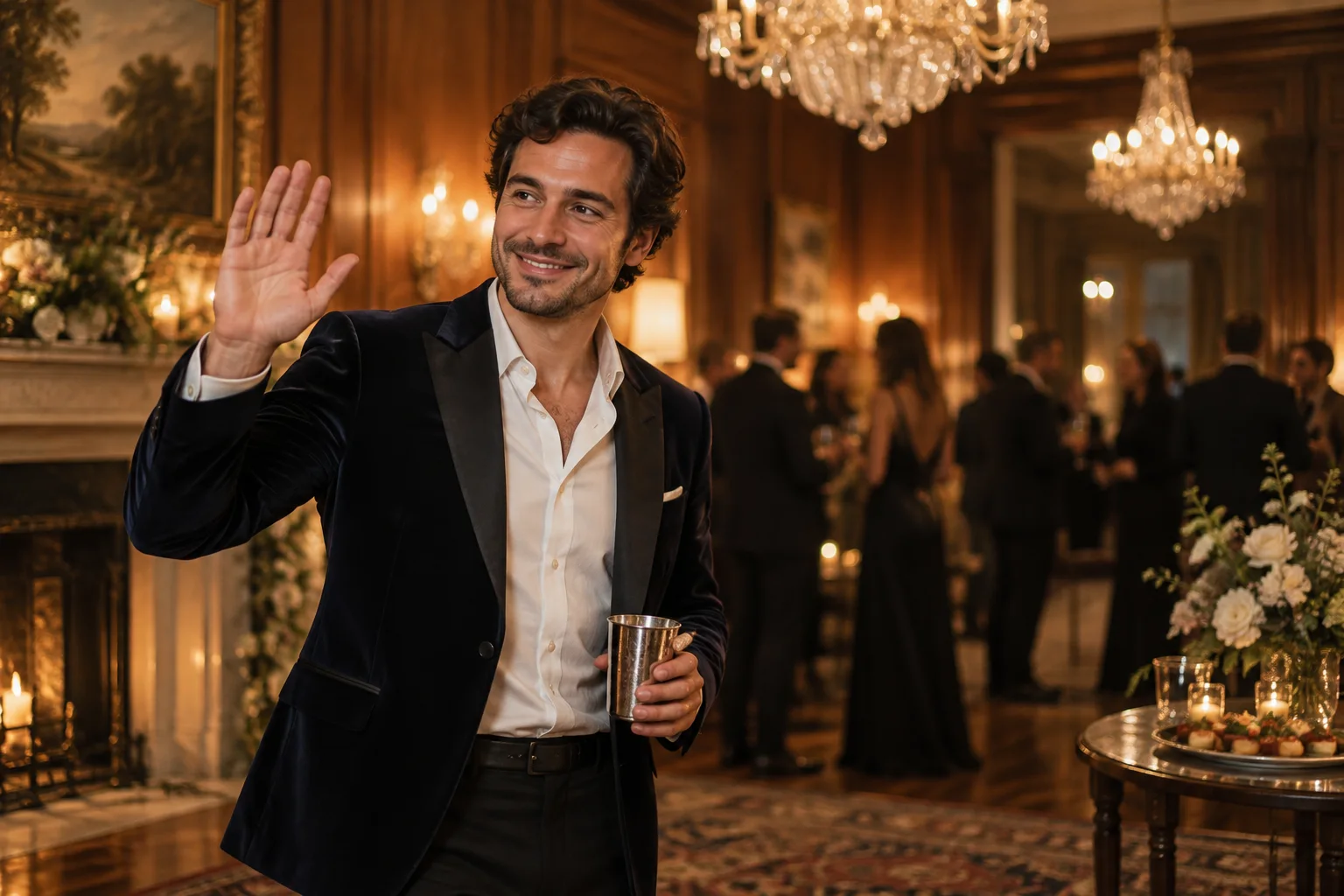
A strong Burning Bridges AI idea starts with a simple performance the viewer can read quickly. The cup remains below shoulder height; the other hand makes the wave and lookout gesture. Those separated actions keep the face visible and give you clear details to check when the Burning Bridges AI result is ready.
For Burning Bridges AI, avoid turning the brief into a complete party film. A procession through several rooms, dancing guests, changing costumes and a dramatic camera orbit are different requests. This scene stays with the supplied participants in one warm room. Extra prominent people are outside its instructions, even if a competitor's example shows a large crowd.
Choose the right photo and outfit
Prepare Burning Bridges AI with a portrait that shows the face clearly and includes the shoulders or upper body. Even lighting helps you compare the Burning Bridges AI reference with the Burning Bridges AI result. Avoid hands across the mouth, dark sunglasses, severe crops or a phone covering part of the head. You do not need to hold a cup in the input.
Burning Bridges AI preserves the visible outfit rather than automatically dressing you as a performer from another video. If you want a jacket or collared shirt in the Burning Bridges AI scene, wear it in your Burning Bridges AI photo. Keep accessories simple enough that a moving hand will not obscure the face or become tangled with them.
A solo Burning Bridges AI setup starts in one-photo mode. You can also use a shared picture containing exactly the intended pair, or switch to two separate portraits. Check that both participants agreed to appear. A group photograph with several faces leaves the cast ambiguous and makes it harder to judge whether the Burning Bridges AI result followed your request.
Use the preset, then check the quote
The Burning Bridges AI creator opens with Chandelier Party selected. Add your Burning Bridges AI portrait before changing other settings. Choose the available model, duration, resolution and format, then inspect the live credit quote. Different models expose different options, so use the controls you can actually see instead of copying specifications from another service.
For your first Burning Bridges AI request, keep the default scene and make only a small compatible adjustment if needed. A detail such as warm amber lighting supports the existing room. An instruction to remove the cup or move the action outdoors contradicts the Burning Bridges AI scene you selected and belongs in a different effect.
Burning Bridges AI generation needs an account, usable credits and confirmation that you have permission to animate the Burning Bridges AI photos. Read the quote immediately before submitting. A screenshot from an earlier session is not an authoritative price for the current Burning Bridges AI request. You can change settings and review them without commissioning several video experiments.
After submitting Burning Bridges AI, follow the recorded task rather than creating a second request just because the page feels slow. A network interruption does not establish that the render has failed. Check your history and retain the Burning Bridges AI task identifier if you need help understanding its status.
The cup, the hand and the camera
The Burning Bridges AI direction keeps an eye-level view with the face, cup and moving hand visible. The performer steps forward slightly, waves, does a brief lookout gesture and ends smiling. The cup should stay separate from the face. The free hand should not merge with its rim or pass through the head.
When Burning Bridges AI includes two people, both uploaded identities remain the intended cast. Look for duplicated cups, swapped faces or one participant disappearing behind the other. The template asks for natural anatomy and a restrained camera, but an instruction is not proof that every output will satisfy it.
The Burning Bridges AI picture in this guide is a generated concept illustration. It describes the warm lighting and silver-cup composition; it is not a verified output from your chosen video model. Use the picture to understand the Burning Bridges AI scene, then assess motion and identity consistency from the actual completed file.
Add sound deliberately
With generated music selected, Burning Bridges AI requests a quiet original hip-hop instrumental and room ambience. The preset does not include a recognizable artist's recording or cloned vocals. This gives the Burning Bridges AI scene its own sound without making a claim about permission to distribute another track.
Before sharing Burning Bridges AI, listen to the download. If you add music later, use audio you have permission to use under the destination platform's applicable conditions. Do not assume a song available to one account, country or posting format is available for every commercial use. You can also keep the generated instrumental if it suits the edit.
A practical review that avoids unnecessary rerenders
Evaluate Burning Bridges AI from beginning to end with the reference nearby. Check the eyes, jaw, hairstyle and outfit, followed by the moving hand and cup. Then examine whether the Burning Bridges AI sequence actually contains the intended wave and lookout gesture. A convincing final frame can hide an earlier identity change.
If Burning Bridges AI needs another attempt, write down the specific problem first. A tighter reference crop may help an unreadable face, while fewer simultaneous actions may help a crowded composition. Change one meaningful input before repeating the request. Each new render should answer a clear question about what improves the Burning Bridges AI result.
A Burning Bridges AI task marked failed or canceled follows the service's credit-return handling. A completed result that does not match your taste is not automatically the same status. Check the record before retrying or contacting support, and avoid treating a temporary status-fetch error as a final outcome.
Questions about Burning Bridges AI
Is this an official artist tool?
This is an independent scene, with no artist affiliation. A silent excerpt guides the gestures, while your portraits supply the identities. The output is a newly generated performance rather than a replacement inside the original recording.
What if I want a different performance?
Choose the street freestyle for a pink shirt and rhythmic gestures outside a red entrance. Choose the rain-dance scene for coordinated movement outdoors. For generated rap between two people, use Hotel Lobby. Each page prepares a different core action.
Can I add captions?
Prepare the Burning Bridges AI scene without asking the video model to write a title inside the room. Add captions after downloading, using your editor's readable text controls. Keep the cup and face visible in the final crop and replay the finished edit before publishing it.