
Hotel Lobby AI Photos
The Hotel Lobby AI photos show an unobstructed face, useful shoulder detail and lighting that makes features easy to read. Begin with two separate portraits when you want explicit left and right casting. A shared photograph can work through the one-photo mode, but both subjects must remain clearly visible.
This guide describes practical preparation, rather than measured success rates. The comparisons below are generated illustrations. They show what to look for in an input; they are not a benchmark of output likeness or a promise that one photograph will always succeed.
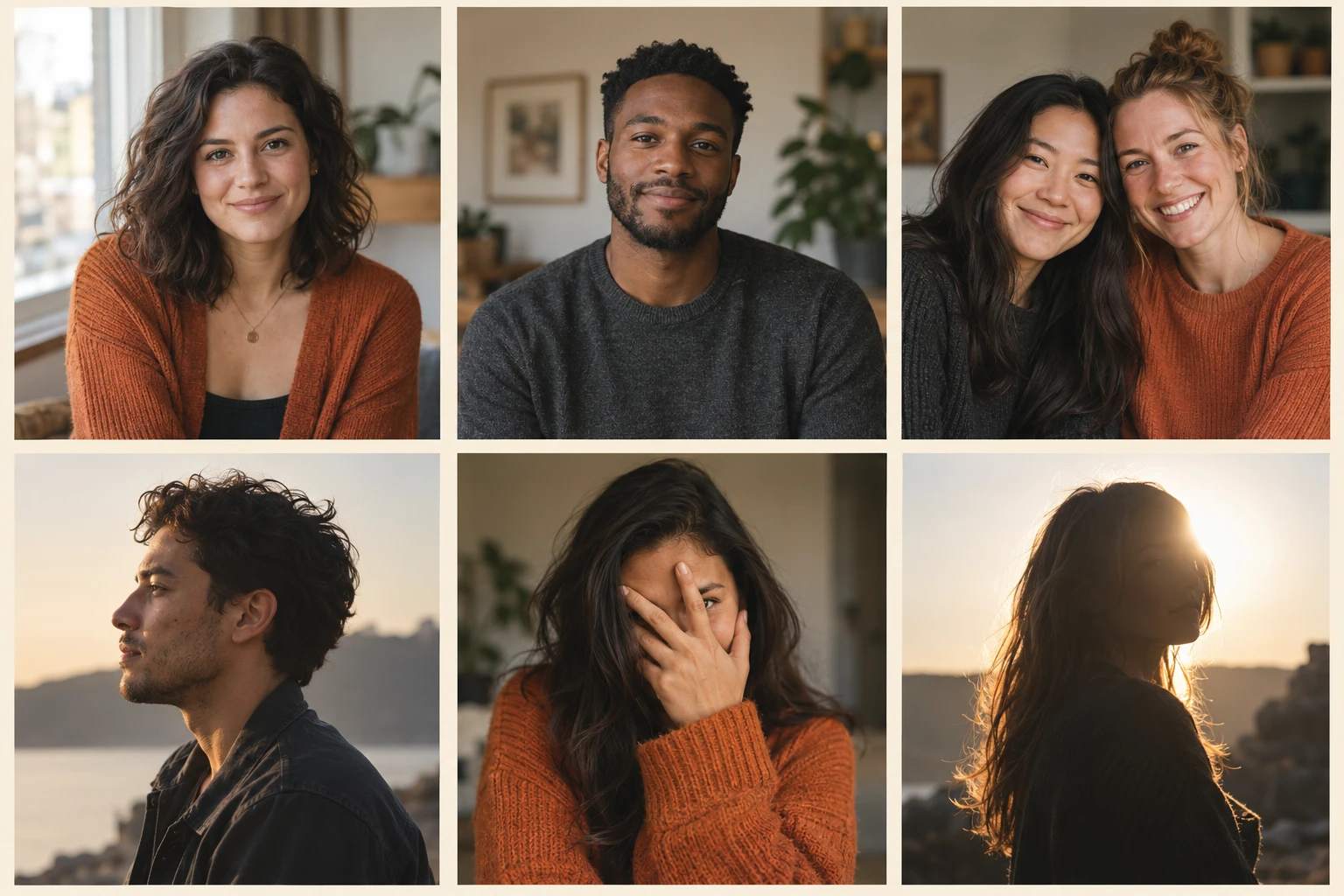
AI-generated comparison. Top row: clearer references. Bottom row: profile, obstruction and difficult light. Individual results still require review.
Inspect faces in your Hotel Lobby AI photos
When choosing the Hotel Lobby AI photos, enlarge each of your Hotel Lobby AI photos before uploading. You should be able to identify the eyes, nose, jaw and hairline without guessing. If the original Hotel Lobby AI photos look soft, a larger export cannot restore information that was never captured. Prefer the camera originals for your Hotel Lobby AI photos over a compressed messaging screenshot.
For Hotel Lobby AI photos, a mostly front-facing pose is a useful starting point. A slight turn can still reveal both eyes and the shape of the face. A strong profile in Hotel Lobby AI photos removes information from the hidden side. If you have several options, compare them at the same display size and choose the image whose features remain easiest to recognize.
Compare six situations when choosing Hotel Lobby AI photos
Use this checklist for the Hotel Lobby AI photos before spending credits:
| Photo situation | Useful reference | Prepare another photo when |
|---|---|---|
| Front or slight angle | Both eyes and jaw are visible | A full profile hides half the face |
| Face obstruction | Hair and glasses leave features readable | Hands, masks or sunglasses conceal features |
| Light | Soft, even light across the face | Backlighting makes the face a silhouette |
| Half-body framing | Head, shoulders and outfit are visible | The chin or head is cut off |
| Shared photograph | Two separate, similarly clear faces | One person overlaps or hides the other |
| Background | Simple surroundings and clear subject edges | Mirrors or crowds introduce competing faces |
Match your Hotel Lobby AI photos without changing identities
The Hotel Lobby AI photos do not need matching clothes. They need compatible detail. A bright outdoor portrait and a dark nightclub picture give the generator very different information. Taking both Hotel Lobby AI photos beside the same window is a practical way to reduce that difference.
Keep enough clothing visible to communicate the intended Hotel Lobby AI photos appearance. A tight Hotel Lobby AI photos crop tells the model less about shoulders and outfits. A full-body Hotel Lobby AI photos reference may make the face tiny. A clear half-body portrait balances these needs. Keep distinguishing details, such as a recognizable hairstyle, but avoid asking one small reference to communicate every accessory.
Hotel Lobby AI photos: separate portraits or a shared image?
For controlled casting, the Hotel Lobby AI photos are often separate inputs. The first of your Hotel Lobby AI photos supplies the intended left performer and the second of your Hotel Lobby AI photos supplies the right performer. Check the upload previews and use the swap control if you want to reverse them. Written casting instructions guide generation; inspect the final result to confirm the positions.
Choose the one-photo option when you already have clear Hotel Lobby AI photos of the pair. Upload that shared image through the matching mode rather than uploading the same group photo twice. Both faces should be distinct, sufficiently large and free from overlap. This approach provides shared lighting and outfits, while separate portraits give you more independent selection.
Prepare Hotel Lobby AI photos without reshaping faces
Preparing the Hotel Lobby AI photos can be simple: straighten an accidental tilt, remove unnecessary empty space and keep a complete face. Preserve the original as a separate file. Avoid heavy smoothing, exaggerated facial reshaping or filters that replace meaningful details. The model can only use the appearance supplied in the reference.
Check the supported Hotel Lobby AI photos file types and file limits displayed in the upload control. A valid file among your Hotel Lobby AI photos that remains too blurry is still a weak reference. Conversely, a sharp file among your Hotel Lobby AI photos may need a smaller export to meet a file limit. Review the displayed Hotel Lobby AI photos thumbnail after uploading; it confirms which file will be used.
Hotel Lobby AI photos: permission and audience
Before uploading the Hotel Lobby AI photos, get permission from the people pictured to animate their likenesses. Permission to keep a personal photograph and permission to publish an AI performance are separate decisions. For public examples, use authorized material or clearly identified synthetic characters.
Our documented demonstrations identify synthetic inputs separately from real-person photographs. Pets and animated characters are different kinds of references; their anatomy and styling can change how the generated movement looks. Treat those experiments as their own cases, and inspect proportions rather than assuming portrait advice guarantees the same behavior.
Upload, review and change one variable
After selecting the Hotel Lobby AI photos, choose duration, framing, resolution and audio in the actual creator. Review the live quote before submitting. Start with a specific objective, such as testing whether both subjects remain recognizable throughout a short vertical clip.
If a result is weak, first identify the symptom. A hidden face suggests a clearer reference. Swapped identities suggest checking input order. Unstable clothing suggests a simpler outfit reference. Change one input or setting at a time so the next result can answer a useful question. A new submission can consume additional credits.
Choose the Hotel Lobby AI photos before changing any audio or output setting.
For a quick lighting check, take one photograph facing a window and another with the window behind you. Compare the eyes, cheek detail and clothing edges at the same size. Keep the clearer reference without brightening it so much that skin loses texture. Move distracting objects out of the background before taking the picture, rather than relying on an editing step to remove them afterward.
Try your selected portraits
Upload the pair, check their positions and review the quote before generating.
Upload your photos
Continue with the complete walkthrough, current specifications or troubleshooting guide when you need the next step.
A final Hotel Lobby AI photos selection check
Keep two candidate sets of Hotel Lobby AI photos in separate folders, with the same person consistently labeled left or right. Compare face detail at equal viewing size before uploading. The larger file is not automatically the clearer one. After choosing Hotel Lobby AI photos, check whether the upload preview shows the expected person and clothing. If the next result still drifts, keep the same output settings while replacing only the uncertain portrait. That lets your Hotel Lobby AI photos comparison answer a specific question rather than mixing several changes.
Sources
- Product controls: current local creator and studio settings, reviewed October 4, 2026.
- Features and input requirements.