
Hotel Lobby Prompt: Choose Where to Use It
A Hotel Lobby prompt has two useful destinations here: an original rap topic that opens our creator with the topic filled in, or a visual generation brief to adapt in another video tool. The public creator has no visual prompt input. Its scene selector applies built-in instructions instead. Pick the matching route before copying a Hotel Lobby prompt, so your next step is clear.
- For original rap, choose a topic below and use Make this original rap.
- For a built-in scene, select its brief and use Use this built-in scene.
- For another tool, copy the visual brief and attach your photos there.
Original rap topics you can use on this site
Each Hotel Lobby prompt topic names the people, an occasion and one personal detail. The button opens the original-rap creator with the complete topic prefilled, plus editable background and format settings. Upload your own photos and review the quote before submitting. Copying this Hotel Lobby prompt topic is optional; the button saves that step.
Friends reunion
Alex and Sam reunited after a year apart, laughing about their terrible camping trip, playful and upbeat
Make this original rapCouple anniversary
Alex and Jamie celebrating ten years together, remembering their first rainy road trip, warm and playful
Make this original rapBirthday shout-out
Happy 30th birthday to Maya, celebrating with her friend Jordan, our favorite weekend baker, cheerful and affectionate
Make this original rapSiblings and friendly rivalry
Adult siblings Alex and Morgan debating who makes the best Sunday pancakes, affectionate and lightly competitive
Make this original rapGolden-years celebration
Two older adult friends celebrating forty years of friendship and their weekly garden walks, joyful and gentle
Make this original rapCoworkers and business partners
Alex and Taylor opening their neighborhood bakery, celebrating fresh bread and their early-morning team, upbeat and welcoming
Make this original rapWedding toast
Nia and Daniel celebrating their wedding and their first dance, a joyful affectionate toast with a playful original rap
Make this original rapGraduation celebration
Leila and Ben celebrating university graduation after years of late-night studying, proud and upbeat about their next chapter
Make this original rapTravel partners
Sofia and Priya remembering their sunrise mountain hike and the train they almost missed, adventurous and playful original rap
Make this original rapWorkout partners
Marcus and Oliver celebrating their first completed 10K run together, supportive and energetic, proud of their teamwork
Make this original rapWhat your Hotel Lobby prompt topic changes
The topic influences the original rap's content and mood. It is not a word-for-word lyrics input, and it does not select props, camera movement or a custom location. For example, a Hotel Lobby prompt about a bakery opening gives the song an occasion; it does not build a bakery set. Use the visible background selector for the available rap stages.
Keep a Hotel Lobby prompt topic to one sentence: names, one shared memory and a tone such as playful. Listen before sharing, because the Hotel Lobby prompt influences the song without guaranteeing exact wording.
For a birthday Hotel Lobby prompt, replace Maya with your recipient and a recognizable detail. A reunion Hotel Lobby prompt can name a story both performers know. These are fictional plans. The original rap walkthrough shows the topic field and a complete example.
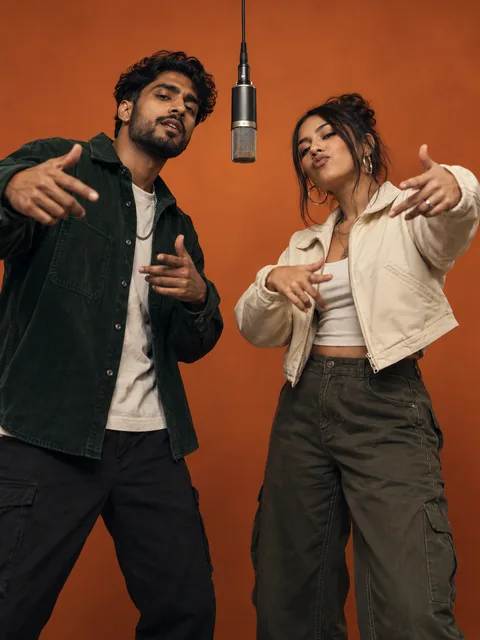
AI-generated scene concept illustrating a duo, clear faces and a hanging microphone; not a verified output of these briefs.
24 visual scene briefs to adapt in another tool
This Hotel Lobby prompt library matches the 24 built-in scene IDs. Select a scene to see its framing, microphone or prop choice, original BGM direction and full copyable brief. A visual Hotel Lobby prompt belongs in a tool that accepts photo references and a visual text prompt. Check its audio support before requesting music.
The Use this built-in scene button opens our creator with that scene selected. It uses the shared scene instructions; it does not paste a visual Hotel Lobby prompt into a hidden field. The Copy for another tool button copies the complete brief, then explains where to use it. Scene images are generated concepts rather than completed case videos.
Street Freestyle
For a photo-to-video tool with a visual prompt field. The images are AI-generated concepts. Sound needs a model with audio support, or separate music editing.
- Framing & camera
- Stable eye-level knee-up shot; all supplied performers, hands and faces stay visible against a red-lit night-time entrance. No invented people.
- Microphone & props
- No microphone. One small portable speaker sits on a side table and is never held by an added person.
- Original BGM direction
- Original instrumental dembow-inspired groove around 100 BPM, light percussion and restrained bass with quiet street ambience. No vocals, artist imitation or borrowed melody.
Read the complete generation brief
Adapt a Hotel Lobby prompt to the references you supply
Attach your photos before adapting a Hotel Lobby prompt. Use one shared photo when both subjects are clearly visible, or two independent portraits when you need separate identities. Map first and second references to the target tool's actual attachment labels. Do not invent tokens such as Image 1 unless that tool recognizes them. The photo guide explains useful facial detail and unobstructed references.
A Hotel Lobby prompt for a two-person hug needs two people. An animated portrait can keep one person without inventing a partner. The clone scene explicitly requests copies, while other briefs keep the supplied subjects distinct. Those differences are built into the scene directions. Keep a Hotel Lobby prompt's subject count consistent with the photos and action instead of adding contradictory instructions.
Choose framing and microphone placement deliberately
The rap Hotel Lobby prompt starts with a stable waist-up two-shot. Faces and gesturing hands remain readable, and one silver condenser microphone hangs between the performers on a black cable. Its placement leaves both faces clear. The concert brief uses separate handheld microphones because the action is a stage performance.
For other scenes, a Hotel Lobby prompt can specify no microphone. Hugging needs free arms; a clothing transition needs a complete outfit in frame. Levitation and dancing use wider views that show feet, movement and the ground. Earth zoom begins closer before pulling away. These are requested directions, not adjustable framing controls in the public form or guarantees that every render will match.
Revise one Hotel Lobby prompt camera choice at a time: a fixed view and a moving orbit conflict. Inspect the Hotel Lobby prompt result throughout the clip, because a still frame cannot confirm motion.
Separate original BGM from lyrics and reference audio
The rap Hotel Lobby prompt requests an original hip-hop beat and original vocals around your topic. Scene effects use instrumental directions: soft piano for a comforting embrace, ambient pads for an aurora, or retro funk for a gas-station dance. Tempo and instrumentation are creative requests, not exact audio specifications or separate controls in the form.
A visual Hotel Lobby prompt cannot make a silent model produce sound. Use an audio-capable model, or add an original instrumental after export. When adapting a Hotel Lobby prompt, remove its audio paragraph if the external workflow handles music separately. The audio guide distinguishes original rap, fixed reference sound and later music replacement. AI original song generates vocals, music and pictures together. The separate Hotel Lobby original song mode follows a fixed reference; a topic does not rewrite its recording. These copied visual briefs belong in a compatible external tool, not in the topic field.
Historical and specialist Hotel Lobby prompt briefs
The retained briefs below support older links and external workflows. Selective replacement needs an editor with subject selection and a reference video; animal animation needs appropriate reference support. Neither feature is activated by leaving a photo slot empty. Keep these conditions with the copied Hotel Lobby prompt.
Six retained external-tool briefs
Friends duo
Couple
Siblings
Costume contrast
Pet and owner
Selective replacement
After copying, prepare and inspect the complete result
Save the Hotel Lobby prompt with its photo mapping, scene, model and sound choice. Review the quote before submitting a built-in scene. For an external Hotel Lobby prompt, confirm whether the tool creates new motion or edits a reference clip; those operations need different inputs.
Play the Hotel Lobby prompt result with sound and inspect faces, hands and clothing. The task and download tutorial covers saving; documented examples show recorded outputs. Keep the Hotel Lobby prompt and original file for comparison.
Sources
- Current public creator, topic settings, scene catalog and generation prompt builder, reviewed October 5, 2026. The 24 brief directions and backend scene instructions share the same source.
- Existing imagegen scene posters generated October 5, 2026. They illustrate proposed scenes; no new video generation or output benchmark is claimed.
- RapDuo scene ideas, read October 5, 2026 for the pairing-to-one-sentence-topic organization. Topics and directions on this page are original.