
The short answer: two adults and one imagined infant
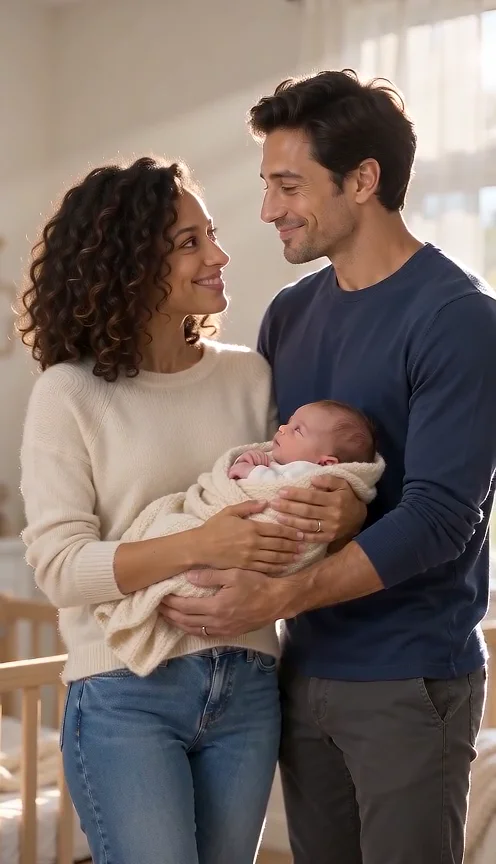
The AI Baby Generator requests a short video in which two photographed adults share a quiet nursery moment with one fictional newborn. Both adults cradle the baby, look down and exchange a small smile. The AI Baby Generator uses photographs to guide the adults' appearance; it invents the infant, surroundings and motion.
This AI Baby Generator is a creative scene tool, not a genetic prediction. It cannot tell you what an actual future child will look like. Treat the imagined infant as part of a visual daydream, and make that clear when you share the AI Baby Generator video with your partner or family.

AI Baby Generator example: Seedance Mini, ten seconds, generated October 7, 2026. Two fictional adult references become a nursery scene with one imagined infant, shared support and exchanged smiles. The MP4 contains generated audio. Face resemblance, hands and sound need your own review; this one example is not a genetic prediction or a guarantee.
A moving scene instead of a baby portrait
An AI Baby Generator still image shows one arrangement at one instant. This page prepares a sequence: supporting arms, brief glances, a tiny infant movement and a settled ending. The video format makes continuity important. A believable opening frame does not establish that the AI Baby Generator preserves hands, faces or blanket position throughout.
The AI Baby Generator keeps the uploaded adults central rather than replacing them with anonymous parents. Its scene allows exactly one new infant and no additional adult identities. This exception belongs to the AI Baby Generator scene only; selecting a regular hug or portrait scene does not authorize an invented child or another partner.
Prepare the AI Baby Generator in three steps
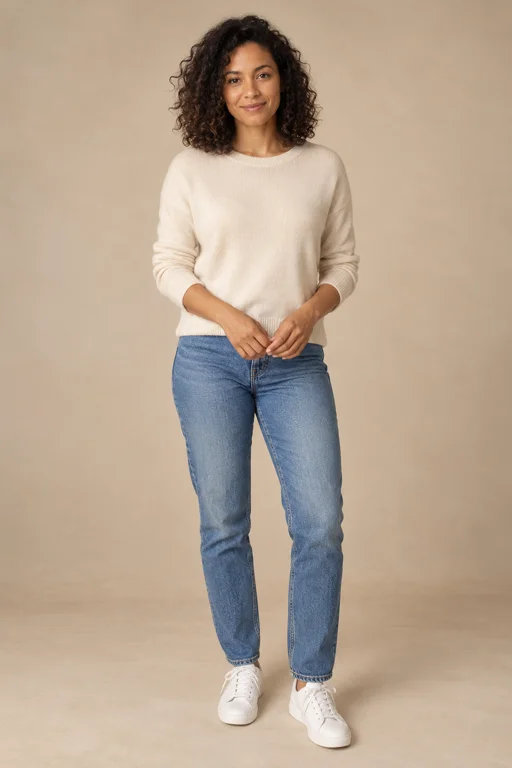
- Add the adults. Upload two separate photos, each containing exactly one adult. The AI Baby Generator requires both portrait slots and does not support a solo reference or a shared photograph in this setup. Choose clear faces that you have permission to use.
- Keep Future Baby selected. Review the length, format, quality and quote. The AI Baby Generator starts with original music enabled. There is no need to write an instruction asking for an extra person; the single fictional infant is already part of the scene.
- Submit and inspect. Confirm permission and use the AI Baby Generator button when the setup is ready. Watch the downloaded result from start to finish, paying attention to who supports the infant and whether both adults stay recognizable during their glances.
What the nursery scene requests
A calm room with a stable view
The AI Baby Generator asks for warm daylight in a quiet nursery. A stable medium composition leaves room for two faces, the blanket and supporting hands. It does not preserve the original portrait background. These AI Baby Generator directions define the requested setting, not a promise of a particular room layout or decor catalogue.
One fictional newborn
The AI Baby Generator adds one infant in a soft blanket, with a small natural hand movement. The appearance is generated, without a fixed baby identity or genetic calculation. If you create another AI Baby Generator request, the imagined infant may look different; this workflow does not provide a saved child profile for matching future renders.
Shared support and gentle interaction
Both adults should remain present in the AI Baby Generator scene, sharing the cradle pose rather than passing the infant quickly between them. Their attention moves from the baby to each other. Check supporting hands and face separation, since contact and occlusion can expose mistakes that are easy to miss in a small thumbnail.
Soft original sound
The AI Baby Generator requests a gentle original piano and music-box instrumental. It does not request spoken words, a borrowed lullaby or a cloned family voice. Listen to the actual result before sharing. The AI Baby Generator example contains an audio track; its originality and exact musical quality have not been independently established.
Ideas for sharing an imagined family moment
An AI Baby Generator video can be a playful anniversary greeting, a private conversation starter or an explicitly fictional family keepsake. Make it together when the idea involves your partner's appearance. The scene can communicate affection without suggesting that the AI Baby Generator has measured inherited features or predicted a real child.
For family sharing, add a plain caption such as “our AI-created daydream.” Do not label the AI Baby Generator infant as an ultrasound reconstruction or an actual newborn photograph. If a real announcement needs factual details, keep those details separate from the imagined video so relatives understand what the AI Baby Generator represents.
Choose adult photos that are easy to review
Use similar head sizes and clear lighting for the AI Baby Generator. Include shoulders where possible, keep eyes visible and avoid a second face in either portrait. Do not upload a group collage or a child's image as an adult reference. These choices clarify the intended AI Baby Generator cast and give you better material for comparison.
The input check requires two image files; it does not independently determine age or count faces inside them. You remain responsible for supplying one adult per photo. The AI Baby Generator template then requests exactly those two adults and one infant. Generated identity, anatomy and adherence still need review in the resulting clip.
Other warm scenes with different requirements
The family collection covers ordinary greetings and birthday uses. Choose the hug tool for two photographed people meeting without an invented infant, or Photo to Video AI for small portrait movement. Those actions solve different needs from the AI Baby Generator and should not be presented as baby-video samples.
AI Baby Generator questions
Can I use just my own photo?
No. The AI Baby Generator requires two separate adult portraits. A missing second reference is not replaced by an invented partner. For a solo animation, choose Bring to Life instead. The AI Baby Generator infant exception permits one fictional baby, not a fictional second adult.
Is the baby appearance accurate or repeatable?
The AI Baby Generator makes an imagined infant, without predicting genetics or guaranteeing a repeatable face. Do not use the result to infer health, ancestry or a child's future appearance. The adults' images guide adult identity; they are not scientific evidence for the AI Baby Generator infant design.
Is there a verified sample of this new scene?
Yes. The AI Baby Generator example above is an actual paid Seedance Mini render using two fictional adult references. Reviewed frames show two adults cradling one infant, looking down and exchanging smiles. The AI Baby Generator example confirms one output, not universal identity accuracy. Other selectable scenes illustrate their own actions.
What does a baby video cost?
The AI Baby Generator uses the site's credit system and displays a live quote for the chosen setup. Consult pricing before submitting. There is no free-video promise here. A task marked failed and a completed AI Baby Generator result with imperfect resemblance are different situations; consult the site's troubleshooting guidance.
Sources
- Local creator, server-owned scene templates and input validation reviewed October 7, 2026.
- Photo preparation, specifications and pricing.
- RapDuo theme page, used for search intent and section order only. Research recorded in the project's October 7, 2026 competitor analysis; competitor costs and results are not product claims here.