
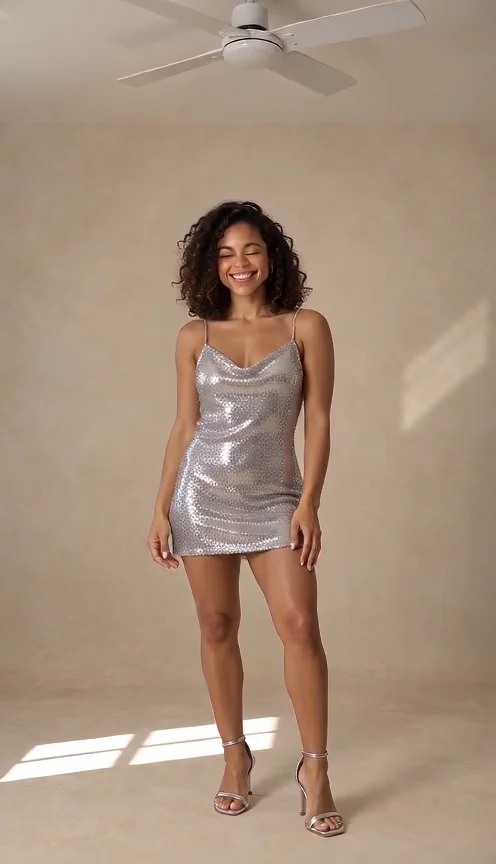
The short answer: a fan scene with repeated outfit changes
Ceiling Fan Outfit Change AI requests a person facing the camera while complete outfits change beneath a visibly rotating ceiling fan. The clothes follow an original casual, hoodie, formal and party sequence, adjusted to fit the duration. Ceiling Fan Outfit Change AI preserves the intended faces and body proportions while allowing the wardrobe to transform.
The movement is more specific than a single fashion turn. Ceiling Fan Outfit Change AI includes the fan, a stable room view and repeated changes timed to musical accents. It has a separate template from Outfit Switch, which asks for one transition. An ordinary wardrobe-change clip does not establish the complete Ceiling Fan Outfit Change AI result.
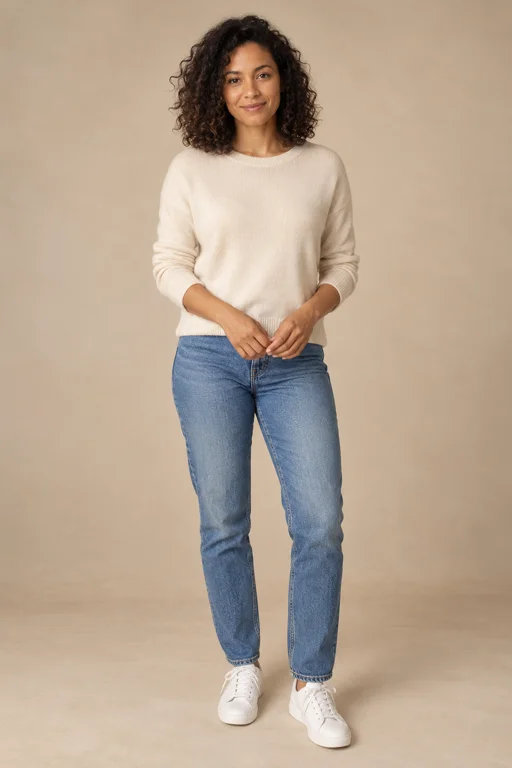
Ceiling Fan Outfit Change AI example: Seedance Mini, ten seconds, generated October 7, 2026. One fictional adult changes from casual clothes to a hoodie, a suit and a party dress beneath the fan. The person stays fully clothed and the final look is held. Small unwanted markings appear on the hoodie trousers. The MP4 contains generated audio; exact beat alignment remains unverified.
How Ceiling Fan Outfit Change AI connects the fan and beat
The Ceiling Fan Outfit Change AI scene uses an overhead rotating fan as a continuing visual anchor. The performer remains beneath it, facing forward with restrained movement, while a clear beat marks each change. The fan does not touch the person or cause a physical costume mechanism; this is a generated visual transformation.
A useful Ceiling Fan Outfit Change AI sequence lets you read one look before the next arrives. Fast flashes can make the clothes impossible to inspect. The template therefore reduces transitions for a short clip and holds the final outfit. Ceiling Fan Outfit Change AI asks for complete garments throughout, including the moments between finished looks.
Prepare Ceiling Fan Outfit Change AI in three steps
- Add your references. Ceiling Fan Outfit Change AI opens with one-photo mode for a solo subject. Choose a clear face and visible clothing. A shared photo may contain exactly two people, or use two separate portraits with one person per slot for a pair.
- Review the sequence length. Keep Fan Outfit Change selected. A five-second Ceiling Fan Outfit Change AI request uses two transitions; eight seconds or longer uses three. Check format, quality and the current quote after changing length, because the requested deliverable affects cost.
- Generate and inspect. Confirm image permission, then submit Ceiling Fan Outfit Change AI when ready. Watch the completed clip with sound, then pause immediately before and after each transition. Compare faces, body scale, complete garments and fan continuity across the entire sequence.
Ceiling Fan Outfit Change AI room and wardrobe
A stable view beneath a visible fan
Ceiling Fan Outfit Change AI requests a clean room and a stable full-body front view. The composition includes shoes and room above the head for the fan. You do not need to photograph a real ceiling fan. Ceiling Fan Outfit Change AI generates the setting around the supplied person while preserving their intended identity.
Several original looks
The Ceiling Fan Outfit Change AI wardrobe starts casual, moves to a hoodie and then formal attire. A longer request adds a party look. These are broad original outfit categories, not exact store products or designer pieces. Ceiling Fan Outfit Change AI has no item-by-item garment selector or clothing-reference upload in this workflow.
The same person across changes
Ceiling Fan Outfit Change AI asks for unchanged facial identity, hair, body proportions and subject count. Clothing changes should not become a different face, larger body or extra person. Compare a stable facial feature across all looks rather than judging only the final frame. A sharply rendered jacket cannot establish identity continuity by itself.
Original sound with readable accents
Ceiling Fan Outfit Change AI requests an original pop-house instrumental with clear beat accents and light fabric sounds. Each change should line up with a beat, while the fan continues turning overhead. The template does not select an existing trending song. Listen to the actual Ceiling Fan Outfit Change AI output before deciding whether the timing works.
Ceiling Fan Outfit Change AI timing by duration
At five seconds, Ceiling Fan Outfit Change AI asks for casual to hoodie to formal: two changes with time to recognize three looks. At eight seconds or longer, it adds formal to party for three changes. This rule limits complexity; it does not multiply outfit changes indefinitely when you choose the longest available duration.
Allowing more time can help the Ceiling Fan Outfit Change AI request leave space between transitions, but it does not guarantee clean fabric or stable anatomy. Review seams, sleeves and shoes during movement. The final Ceiling Fan Outfit Change AI look should remain visible long enough to judge instead of appearing only in the last frame.
Ceiling Fan Outfit Change AI photo advice
For Ceiling Fan Outfit Change AI, use a clear portrait with visible shoulders and clothing; full-body detail gives more information for a head-to-shoes view. Avoid several tiny faces or heavy obstruction. The uploaded background is not the requested room, so a missing fan in the original photograph does not prevent preparing the scene.
For two people, keep both faces separate and legible. Ceiling Fan Outfit Change AI should transform each intended person's clothes while retaining their identity and scale. Use a shared photo only for a clear pair, or deliberate separate portraits. The input arrangement does not permit an arbitrary group to join the Ceiling Fan Outfit Change AI sequence.
Inspect Ceiling Fan Outfit Change AI transitions
Review Ceiling Fan Outfit Change AI immediately around each musical accent. Check whether fabric covers the body continuously and whether arms or hands disappear during the change. Watch the fan for sudden duplication or position changes. These details can be missed when reviewing only a thumbnail or rapidly scrubbing through the video.
Keep the original Ceiling Fan Outfit Change AI MP4 before trimming or adding captions. If the clip has a visual problem, identify whether it concerns identity, clothing continuity or beat timing before another request. Raising resolution alone does not ensure that Ceiling Fan Outfit Change AI will fix the movement or wardrobe issue.
Related transformations
The effects directory includes ordinary Outfit Switch and other visual transformations. AI Clone Video intentionally duplicates a supplied identity, which is a different goal. Photo to Video AI helps with general upload choices. Use those tools for their own actions instead of treating their previews as Ceiling Fan Outfit Change AI evidence.
Ceiling Fan Outfit Change AI questions
Does Ceiling Fan Outfit Change AI need a real fan?
A clear full-body image can help with clothing and shoes, but Ceiling Fan Outfit Change AI does not require a staged fan photograph. The setting and motion are generated. A cropped portrait leaves more unseen detail to invent, so check the complete Ceiling Fan Outfit Change AI result carefully.
Can I select Ceiling Fan Outfit Change AI garments?
Ceiling Fan Outfit Change AI uses broad preset looks and compatible scene details. It does not offer exact garment selection or promise a particular branded outfit. The clothing-change permission applies to this scene, while normal portrait and hug scenes retain their own clothing-preservation directions.
Has this effect been tested with a paid render?
Yes. The Ceiling Fan Outfit Change AI example is a paid Seedance Mini render with one fictional imagegen reference. Reviewed frames show three complete changes beneath the overhead fan: hoodie, formal suit and party dress. Small unwanted trouser markings appear. Two-person output, shorter durations and exact beat synchronization remain unverified for Ceiling Fan Outfit Change AI.
What does Ceiling Fan Outfit Change AI cost?
Ceiling Fan Outfit Change AI uses the existing credit workflow and current quote. Consult pricing and review the selected settings before submission. This page does not promise free generation, a fixed waiting time or perfect transitions. Inspect the downloaded clip before sharing your Ceiling Fan Outfit Change AI video.
Sources
- Local creator, server-owned scene templates and input validation reviewed October 7, 2026.
- Photo preparation, specifications and pricing.
- RapDuo theme page, used for search intent and section order only. Research recorded in the project's October 7, 2026 competitor analysis; competitor costs and results are not product claims here.