
The short answer: run, clear the car, land and turn
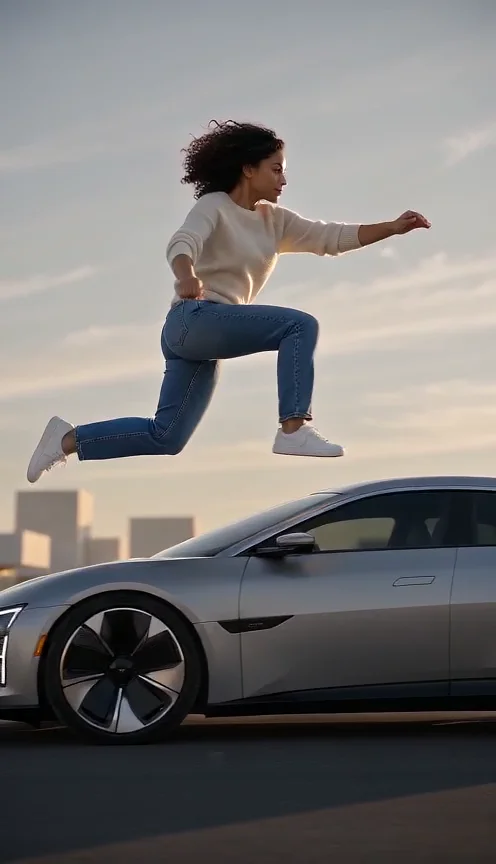
Car Jump AI Video requests a complete fictional stunt from still photographs. The performer takes a running approach, clears a stationary concept car in slow motion, lands beyond it and turns toward the camera. Car Jump AI Video uses the supplied people as appearance references while generating the road, vehicle, bodies in motion and soundtrack.
Car Jump AI Video example: Seedance Mini, ten seconds, generated October 7, 2026. The solo performer runs, passes above the car, lands and turns. Near the rear roof, foot clearance is ambiguous in several frames; this imperfect sample does not prove a completely contact-free jump. The MP4 contains generated audio. Review motion and sound before sharing.
The action matters more than an isolated airborne pose. Car Jump AI Video should contain a readable beginning, crossing and ending within the selected duration. It is a separate scene from Bullet Time, whose main action is a small jump with a camera orbit. A Bullet Time preview does not demonstrate Car Jump AI Video.
Why Car Jump AI Video needs a wide view
The Car Jump AI Video template leaves open space for an approach and landing area. A car parked close to the edge of the frame would make clearance hard to evaluate. The camera therefore requests a wide view that contains complete bodies, the vehicle and the ground, with restrained tracking instead of an obstructive spinning shot.
For two people, Car Jump AI Video keeps both photographed identities distinct through the run and leap. A shared photo should contain exactly the intended pair; separate portraits should each contain one person. Car Jump AI Video does not add an anonymous stunt partner, spectators or traffic to fill out the scene.
Set up Car Jump AI Video in three steps
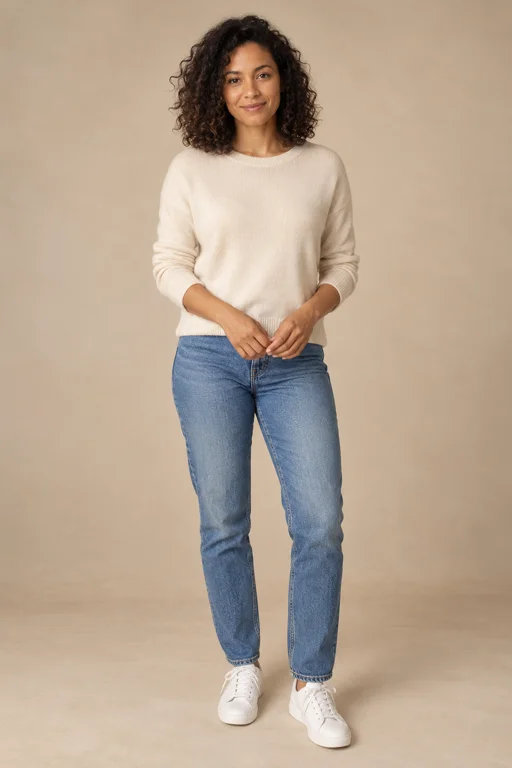
- Add the performer. Car Jump AI Video starts in one-photo mode for a solo subject. Use a clear face with visible clothing and body detail where possible. A shared photo can supply two people, or switch to two separate portrait slots for deliberate paired casting.
- Select the deliverable. Keep Car Jump selected, then review duration, format and quality. Car Jump AI Video allocates time to the approach, airborne crossing and final turn. A longer timeline can leave more space for these stages, without guaranteeing a better stunt.
- Generate and review. Confirm permission, inspect the current quote and submit Car Jump AI Video when ready. Watch the completed MP4 at normal speed first, then pause at takeoff, roof clearance and landing. Check both movement and identity before sharing the result.
Three stages of Car Jump AI Video
Running approach
Car Jump AI Video begins with enough visible movement to establish a path toward the stationary car. Feet should meet the road and the body should advance without teleporting. The approach occupies roughly the first quarter of the requested timeline. Car Jump AI Video does not need a real road or vehicle in your uploaded photograph.
Slow-motion roof clearance
The middle of Car Jump AI Video asks for a complete leap over the roof of one unbranded concept car. Inspect the relationship between feet, body and vehicle rather than only the expression. Car Jump AI Video should not replace clearance with a tiny hop beside the door, a frozen pose or a camera orbit around someone standing still.
Landing and a final turn
The closing Car Jump AI Video movement requests a natural bent-knee landing beyond the car, followed by a turn toward the camera. The final third of the timeline needs enough room to finish the action. Watch for sliding feet, a changed face or a cut that hides the landing in Car Jump AI Video.
Car Jump AI Video vehicle, sound and clothing
Car Jump AI Video generates one stationary concept car with no brand name, logo or license text. The vehicle supplies a visible obstacle, not a selectable make or model. Source clothing and accessories should remain recognizable. Car Jump AI Video invents missing lower-body detail when the uploaded reference does not show a complete outfit.
The sound request uses original cinematic action music, with a rise during the leap and a soft impact timed to landing. Car Jump AI Video does not request an existing film score or celebrity voice. Listen to the actual download to assess synchronization; the soundtrack description is a direction, not proof of a tested audio result.
Car Jump AI Video photo advice
A readable face is essential for comparing Car Jump AI Video identity. Full-body images provide more clothing and limb information, but the uploader does not require a photo taken during a real stunt. Use an ordinary authorized portrait with clear edges and minimal obstruction. Car Jump AI Video generates the action instead of transferring a supplied motion recording.
For a pair, choose similar image scale and avoid either person overlapping the other in a shared reference. Car Jump AI Video accepts one or two intended subjects, not a crowded starting image. Track each person through the leap and turn. Count faces again near the ending so a duplicate or disappearing performer does not escape review.
Share a vertical Car Jump AI Video
Car Jump AI Video opens with the creator's portrait format, which suits a phone-screen clip. Keep the complete car and bodies visible even in a narrow frame; the template asks for appropriate distance. Save the original Car Jump AI Video MP4 before adding a title or trimming it, and label the stunt as AI-generated when publishing.
Related action scenes
Use Earth Zoom Out when the camera journey is the idea. The effects directory includes Bullet Time and other visual actions, while Photo to Video AI explains general photo preparation. Their samples are useful for their respective scenes, but none substitutes for a dedicated Car Jump AI Video sample.
Car Jump AI Video questions
Can I create a duo stunt?
Yes. Car Jump AI Video can use two separate portraits or a clear shared photo of exactly two people. Both supplied identities should remain present. If you use a solo image, Car Jump AI Video requests only that performer and does not invent another jumper.
Can I choose a branded vehicle?
The Car Jump AI Video preset specifies an unbranded concept car. It does not provide a make, model or vehicle-reference upload selector. Compatible scene details cannot override this direction. Evaluate the generated obstacle as part of the fictional Car Jump AI Video rather than expecting a precise automotive product rendering.
Is a finished sample available?
Yes. The Car Jump AI Video example above is a paid Seedance Mini render from one fictional imagegen portrait. Reviewed frames show the approach, airborne passage, landing and final turn. The rear-roof clearance is ambiguous, so this Car Jump AI Video is an honest imperfect example. Two-person output and other durations have not been rendered for acceptance testing.
How much does the stunt cost?
Car Jump AI Video uses the live quote for the selected settings and the existing credit workflow. Check pricing rather than applying another site's fee. A completed imperfect Car Jump AI Video and a task marked failed have different handling; review troubleshooting before preparing another request.
Sources
- Local creator, server-owned scene templates and input validation reviewed October 7, 2026.
- Photo preparation, specifications and pricing.
- RapDuo theme page, used for search intent and section order only. Research recorded in the project's October 7, 2026 competitor analysis; competitor costs and results are not product claims here.